SlideShare Downloader: Save Presentations as PDF or PPT
Free, no login, no watermark. Works on any device.
SlideShare hosts millions of presentations, from university lecture slides and conference talks to marketing decks and industry reports. Viewing them online is easy. Saving one for offline use is harder: the official download usually asks you to sign in, and some uploaders switch downloads off completely.
This free SlideShare downloader turns a public presentation link into a PDF or PPT file in a few seconds, with no account and no software to install. It works only with public presentations. Private or restricted decks cannot be downloaded, and that is by design. The sections below also cover what you can and cannot edit afterwards, how to check a licence before reuse, and what to do when a download fails.
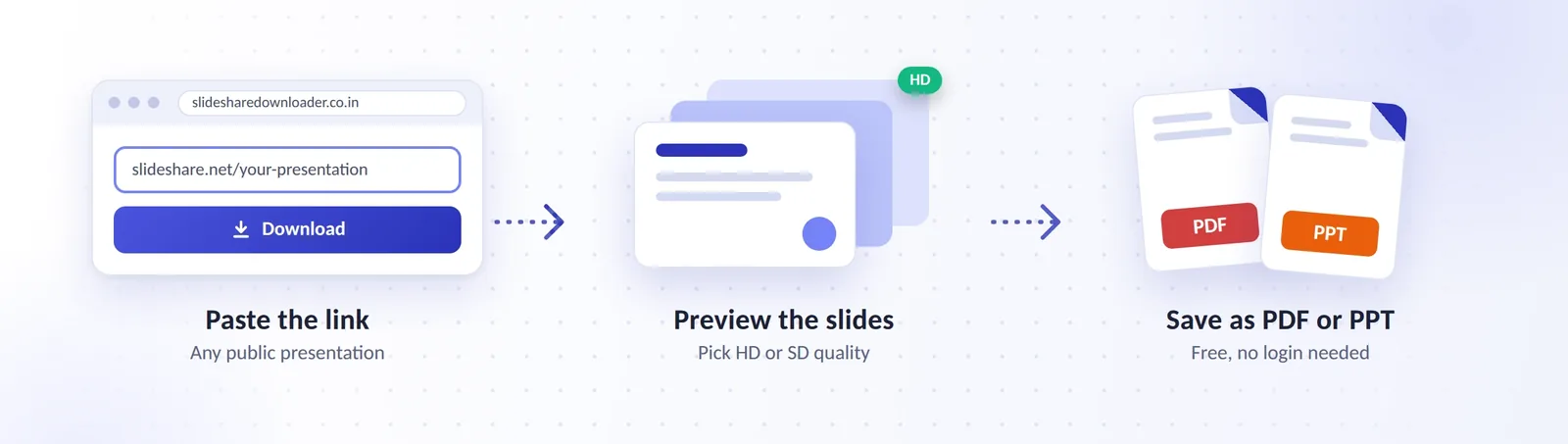
How to Download SlideShare PPT and PDF in 4 Steps
- Copy the link Open the presentation on SlideShare.net and copy the full URL from your browser’s address bar (Chrome, Safari, Firefox, or Edge). On a phone, tap Share, then Copy link.

- Paste it into the tool Click the link field above and paste. Remove any extra spaces before or after the URL.

- Choose a format and quality Pick PDF for reading and printing, or PPT for slides you want to rearrange and present. Choose HD for sharp text, or SD for a smaller file.

- Preview and download Check the first-slide preview to confirm it is the right deck, then click Download and save the file.

SD or HD: Which One Should You Pick?
| Choose | When it fits | Trade-off |
|---|---|---|
| HD | Printing, projecting on a screen, decks with small text, charts, or diagrams | Larger file, slower on a weak connection |
| SD | Reading on a phone, emailing a deck, saving many decks at once | Softer text; very small fonts may blur |
If you are unsure, start with HD. You can always compress a PDF later, but you cannot add sharpness back to a blurry one.
Where the File Lands on Your Phone or Computer
The steps are identical on every device, but the saved file ends up in different places. On Android, Chrome saves it to the Downloads folder. On iPhone and iPad, Safari saves it to the Files app under Downloads. On Windows and macOS, it goes to your browser’s default download folder, usually Downloads. If you cannot find it, open your browser’s Downloads list (Ctrl+J in Chrome on Windows) and click the file name.
Which SlideShare Links Work
Paste the address of the presentation page, which usually looks like slideshare.net/username/presentation-title. A few practical notes:
- Copy the link from the presentation page itself, not from a Google search result, which can add tracking parameters.
- An embed code will not work. Use the page URL instead.
- Expand shortened links (for example, bit.ly addresses) in your browser first, then copy the final SlideShare address.
- If a language-specific address such as es.slideshare.net fails, try the same presentation under www.slideshare.net.
- Links to private, deleted, or login-only presentations return an error.
What Can and Cannot Be Downloaded
| Content type | Works? | Why |
|---|---|---|
| Public presentation | Yes | Anyone can open it without logging in |
| Presentation that asks you to log in to view | No | It is not publicly accessible |
| Private presentation shared with selected people | No | Access is restricted by the owner |
| Deleted or removed presentation | No | There is nothing left to fetch |
| Video or webinar content | No | The tool handles slide decks, not video |
How a SlideShare Downloader Works
SlideShare is a presentation-sharing platform founded in 2006, later owned by LinkedIn and, since 2020, by Scribd. Uploaders add PowerPoint, PDF, or Keynote files, and SlideShare converts them into a slide viewer that anyone can scroll through.
A SlideShare downloader works from what that viewer displays. In plain terms, it does three things:
- It reads the public presentation page you submitted.
- It collects the slides in their original order.
- It assembles them into the file type you chose: a PDF document or a PowerPoint-style PPT.
Why a Downloaded PPT Is Usually Made of Images
Most online converters rebuild a deck from slide images. The result opens in Microsoft PowerPoint, Google Slides, Apple Keynote, or LibreOffice Impress with the right look and order, but each slide is often a picture rather than live text. You can present it, add speaker notes, delete slides, and reorder them. You usually cannot click into a title and retype it. The only fully editable version is the original file from the uploader, which is why the editing section below matters.
Our SlideShare Downloader vs the Official Download and Other Methods
| Method | Login | Output | Best for | Catch |
|---|---|---|---|---|
| This downloader | None | PDF, PPT (HD or SD) | Quick offline copies of public decks | Public decks only; PPT slides are mostly images |
| SlideShare’s official download | Usually required | Often the original file or a PDF, when enabled | Getting the uploader’s own file | The uploader must allow downloads |
| Browser Print to PDF | None | One-off, very short decks | Slow, slide by slide, layouts often break | |
| Desktop software | None to use, install required | PDF or images | Frequent bulk saving | Installation, outdated tools, security risk |
If the uploader allows downloads and you are happy to sign in, the official route can give you the best file, because it may be the original. If not, an online SlideShare downloader is the fastest option for public decks. Desktop programs make sense only if you save decks all day and trust the source of the software.
Features of This Free SlideShare Downloader
PDF or PPT From One Link
Download SlideShare to PDF or PPT from one link. Choose the format after you paste, not before.
Preview First
See the opening slide to confirm you have the right presentation before you download a large file.
HD and SD Quality
HD keeps text sharp for printing; SD keeps files light for phones.
No Sign-Up, No Watermark
You do not need a SlideShare or LinkedIn account.
Any Modern Browser
It runs in Chrome, Safari, Firefox, and Edge on Android, iOS, Windows, and macOS, with nothing to install.
SlideShare to PDF or PPT: Choosing the Right Format
| Format | Best for | Can you edit it? | File size | Opens in |
|---|---|---|---|---|
| Reading, printing, sharing, highlighting | Fixed layout; annotate only | Smallest | Any phone or computer, browsers, Adobe Acrobat | |
| PPT / PPTX | Presenting, reordering slides, adding your own notes | Slides yes; text usually no | Medium to large | PowerPoint, Google Slides, Keynote, LibreOffice Impress, WPS Office |
PPT is the older PowerPoint format, while PPTX is the modern one used since PowerPoint 2007. Current versions of PowerPoint, Google Slides, and Keynote open both. Need a single slide as a picture? Open the PDF and export the page as a JPEG or PNG. To convert SlideShare to PDF, choose PDF before you click Download: it gives the smallest file and keeps the slide order.
Can You Edit the Downloaded Slides?
Partly. You can reorder, delete, and duplicate slides, add notes, and mix them into your own deck. Changing the actual text is harder because the text is part of the image. To get editable text:
- Run the PDF through OCR (optical character recognition). In Adobe Acrobat, export the PDF to PowerPoint and let it recognise the text. In Google Drive, upload the PDF, right-click it, and choose Open with Google Docs to get the text as an editable document. OCR is not perfect, so double-check numbers, names, and special characters.
- Retype the key slides and use the downloaded deck as a visual reference. For a handful of slides this is often faster than fixing OCR errors.
- Ask the uploader for the original file. Many authors share it if you explain how you will use it.
Why Your PDF May Not Be Searchable
A PDF built from slide images has no selectable text, so Ctrl+F finds nothing. Running it through an OCR tool adds a hidden text layer that makes the PDF searchable, lets you copy quotes, and allows screen readers to read it aloud.
What Does Not Carry Over
Image-based conversion usually drops speaker notes, animations, slide transitions, embedded video, and clickable hyperlinks. Layouts and fonts can also shift slightly. Always scroll through the file once before you rely on it for a lecture or meeting, and note the original link so you can find anything that did not survive.
Who Should Use a SlideShare Downloader?
Students
Save lecture decks before exams and study on a commute without mobile data. A SlideShare PDF download is the easiest format for highlighting and printing.
Teachers
Build an offline library of lesson slides and keep presenting when classroom Wi-Fi drops. A SlideShare PPT download is handy for reordering slides into a lesson plan.
Professionals
Keep reference decks, market reports, and training material close for meetings and client work, even on a flight.
Researchers
Archive conference slides and case studies, with the source link saved for citations.
Marketers and Designers
Collect examples of structure and visual flow for inspiration, not for copying.
Is a SlideShare Downloader Safe and Legal?
This section is general information, not legal advice. Copyright rules differ by country.
Public Presentations Only
To download SlideShare without login, the presentation must be public. The tool works only with presentations that anyone can open without logging in. It does not unlock private, paid, or restricted content, and an uploader’s choice to restrict a deck should be respected. The official SlideShare website shows whether an uploader allows downloads for each presentation.
Copyright and Fair Use
Saving a public deck for personal study is very different from re-uploading it, selling it, or presenting someone else’s work as your own. Fair use (or fair dealing, depending on your country) can allow limited use such as study, criticism, or teaching, but it does not cover wholesale copying. For a plain-English overview, read the U.S. Copyright Office’s page on fair use. When in doubt, ask the author.
| What you want to do | General risk | Notes |
|---|---|---|
| Save a public deck for your own study | Lower | Keep the source link with the file |
| Show a few slides in class with credit | Depends on your country’s rules | Credit the author and keep it limited |
| Copy slides into your own work deck | Needs permission or a suitable licence | Follow the licence terms |
| Re-upload or sell the deck | High | Do not do this without written permission |
| Present it as your own work | Not acceptable | This is plagiarism, whatever the licence |
How to Check the Licence and Credit the Author
Uploaders can publish under a Creative Commons licence or keep all rights reserved. Check the licence details on the presentation page. If it is Creative Commons, follow its terms: attribution is always required, and some licences also forbid commercial use or changes. Use this attribution line as a template:
“Presentation Title” by Author Name, from SlideShare (link), licensed under [licence name].
If there is no licence, treat the work as all rights reserved and ask permission before reusing it.
What Happens to Your Link and Files
You do not need an account or any personal details. The link you paste is used to generate your file; see our Privacy Policy for how long anything is kept.
How to Spot a Fake or Unsafe SlideShare Downloader
Be cautious with any site that:
- asks you to install a browser extension, an app, or an .exe or .apk file just to download slides
- shows several look-alike Download buttons or pop-ups
- asks for your email, password, phone number, or payment details
- redirects you to unrelated pages after you paste a link
- has no HTTPS padlock, privacy policy, or contact page
This site is an independent tool and is not affiliated with, endorsed by, or connected to SlideShare, Scribd, or LinkedIn.
Pros and Limits of This SlideShare Downloader
What works well: it is free, needs no login, works on any device, gives you PDF and PPT, and keeps the original slide order and look.
What It Cannot Do
SlideShare Downloader Not Working? Quick Fixes
| What you see | Likely cause | Fix |
|---|---|---|
| “Invalid link” or nothing happens | Link copied from search results, shortened, or an embed code | Copy the URL from the presentation page itself |
| “Not found” | The deck was deleted or made private | Open the link in a private browser window; if SlideShare asks you to log in, it is not public |
| Stuck on processing | Large deck or a busy moment | Wait a minute, switch to SD, or retry on a computer |
| File will not open | Partial download or the wrong app | Download again; use a PDF viewer for PDF and PowerPoint or Google Slides for PPT |
| Blurry slides | SD selected, or a low-resolution upload | Choose HD; a low-quality original cannot be improved |
| PDF will not search or copy text | The PDF is made of images | Run it through OCR to add a text layer |
| File is huge | HD plus many slides | Choose SD, or compress the PDF afterwards |
| Works on desktop, fails on phone | Mobile browser or ad blocker conflict | Use Chrome or Safari, pause ad blockers, or request the desktop site |
Plan B: Other Ways to Get the Slides
Use SlideShare’s own download if the uploader allows it and you are willing to sign in.
Message the Author
Many presenters share the original file on request, or link it on a personal site or LinkedIn profile.
Search the Deck’s Title Elsewhere
Authors often post the same slides on their own website, Speaker Deck, or Google Drive.
Print to PDF From Your Browser for Short Decks
It works, but it is slow and layouts often break.
After the Download: Open, Edit, and Reuse
- Google Slides: upload the PPTX to Google Drive, or use File, then Import slides, to bring individual slides into your own deck.
- PowerPoint and Keynote: open the file directly, then copy slides into your own presentation.
- Canva: upload the PPTX or PDF and import the pages into a design.
- Smaller files: if a PDF is too large to email, reduce its size in Adobe Acrobat or a PDF compressor.
- Stay organised: name files “Topic – Author – Year” and save the source link in the file name or a note, so you can credit the author and recheck the licence later.
Frequently Asked Questions
Is this SlideShare downloader free?
Yes. You can download public presentations without paying or creating an account.
Can I download SlideShare presentations without login?
Yes. You do not need a SlideShare or LinkedIn account. Paste a public link, choose a format, and download.
Can I download a SlideShare presentation as a PDF?
Yes. PDF is the best choice for reading, printing, and sharing, and it keeps the original slide order and layout.
Will the PPT be fully editable?
Partly. You can rearrange and delete slides, but the text is usually part of the image. Use OCR or ask the uploader for the original file if you need editable text.
Does it work on iPhone and Android?
Yes. Use Safari on iPhone or iPad and Chrome on Android. Downloaded files appear in the Files app or the Downloads folder.
Should I choose HD or SD?
Choose HD for printing, projecting, and decks with small text or charts. Choose SD for phones, email, and saving many decks.
Why does my PDF have no selectable text?
The PDF is made from slide images. An OCR tool can add a text layer so you can search and copy words.
Are speaker notes and animations included?
Usually not. Image-based conversion keeps the look of each slide but drops notes, animations, transitions, and embedded video.
Can I download private presentations?
No. The tool works only with public presentations, and restricted decks stay restricted.
Can I download SlideShare videos?
No. The tool is built for slide decks, not video or webinar content.
Is it legal to download SlideShare presentations?
Saving public slides for personal study is generally low risk, but copyright still applies. Do not re-upload, sell, or pass off someone else’s work, and check the licence before reuse. This is general information, not legal advice.
Is it safe to use a SlideShare downloader?
It is safe when the site asks for nothing beyond a link. Avoid any tool that wants an installation, a login, or payment details just to download slides.
Why will my link not work?
The most common causes are a link copied from search results, a shortened link, an embed code, or a deck that is private or deleted. Copy the URL straight from the presentation page and try again.
How can I credit the author when I reuse slides?
Use the attribution line from the licence section: title, author name, SlideShare link, and the licence name. If there is no licence, ask for permission first.
Conclusion
With this SlideShare downloader, copy the link, paste it, pick PDF or PPT, and save the slides in seconds. Keep it to public presentations, check the licence before reusing anything, and credit the author. For everything else, the troubleshooting table above covers the most common problems. Use PDF when you want to read or print, and PPT when you want to present or edit the slides. If you ever get stuck, the contact page is always there to help.